
Home / Free Tools And Solutions / PureField
PureField: Open, Flatten, Label and Print-Optimize Any PDF, Right in Your Browser
PureField is a PDF engine built from scratch. It does four things that are hard to find in a free tool, and it does them without sending your file anywhere:
- Opens XFA forms. Many government, tax, immigration and business forms are XFA forms, made with Adobe LiveCycle Designer. Outside Adobe Reader they don't open. Chrome, Edge, Safari, Apple Preview, phones, printers and most e-signature services show only “Please wait… If this message is not eventually replaced by the proper contents of the document, your PDF viewer may not be able to display this type of document.” Firefox draws some of them, often with sections missing. PureField turns them into ordinary PDF pages that look the way Adobe Reader prints them, with the filled-in values.
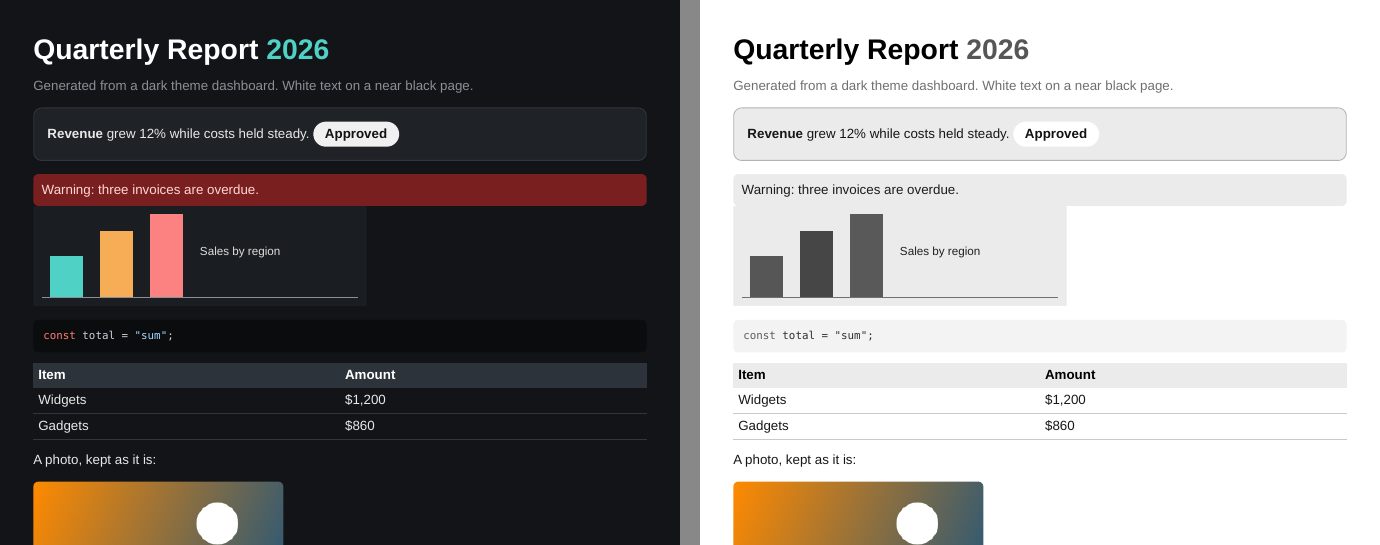
- Makes dark PDFs print-friendly, intelligently. Slide decks, dark-mode exports and designer manuals with dark backgrounds eat toner and print as muddy pages. Other tools invert every colour, print in grey, or turn each page into a blurry picture. PureField reads each page, works out what is a background, what is a border, what sits on what and what is a photo, and re-renders it black on white: backgrounds become white, the text on them turns dark, colours become greys, and photos are left exactly as they are. The text stays sharp, searchable text.
- Flattens fillable forms. In regular fillable (AcroForm) PDFs, the values become part of the page. They print the same in every viewer and can no longer be changed by accident.
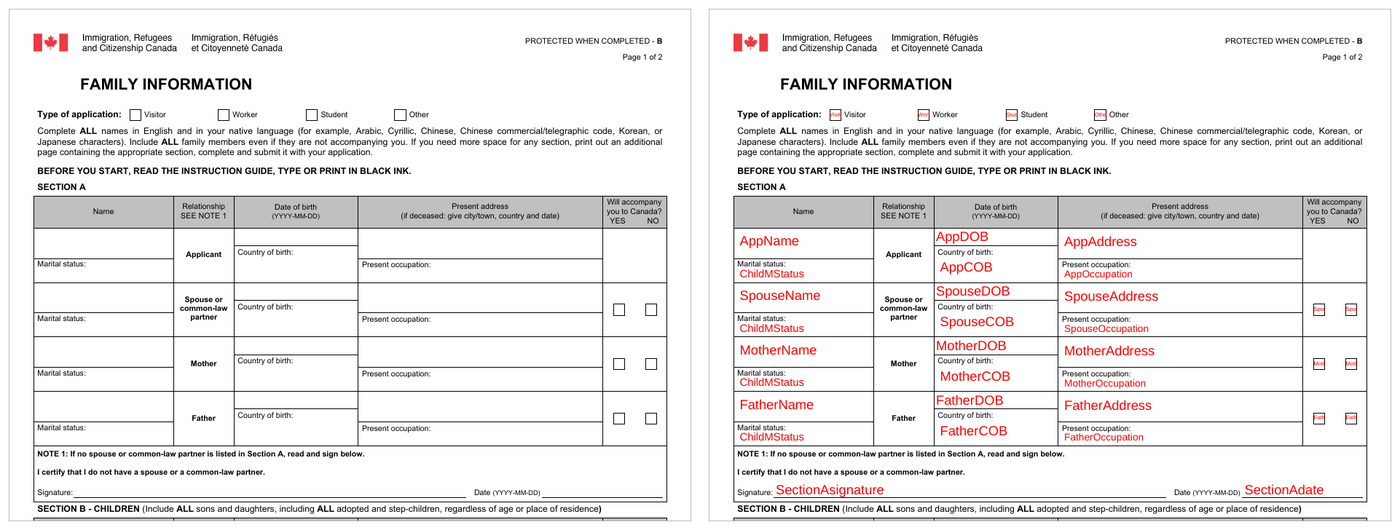
- Shows every form field's name. Any form, XFA or fillable, can be printed with each field's name written where its value goes. Anyone who connects a form to other software (a database, a document generator, another company's system) needs to know which field is which, and the names are normally buried inside the file. With one checkbox you get a map of the whole form you can print, share and mark up.
Why it works when other tools don't
It reads the form the way Adobe Reader does. An XFA form isn't really pages. It's a description of a form (sections that repeat, tables that grow, pages that break) plus the data typed into it. Most PDF software skips that description and shows whatever placeholder page the file carries. PureField follows the XFA rules: it binds the data, runs the form's own calculations and show/hide scripts in a sandbox, lays the pages out, and draws them. Those rules were checked against Mozilla's pdf.js, the engine behind Firefox's partial XFA support.
It keeps the details people notice. Fonts the form names but doesn't include are replaced by freely licensed lookalikes of exactly the same width, so lines break where Reader breaks them. Barcodes are drawn as real barcodes, from Code 39 to PDF417, QR Code, Data Matrix and the postal codes. Comments, stamps and markup print, and so do Arabic, Hebrew, Chinese, Japanese and Korean text.
The print optimizer reads the page, not just the colours. A simple “invert colours” ruins photos and turns black text white. Instead, PureField reads each page in the order it's drawn and works out what sits on what. A dark fill that covers the page, or has light text on it, is a background: it becomes white (or a light grey tint for smaller panels), and everything on it flips to dark. A dark box with a lighter box inside it is a border, so it stays. A box drawn in the same colour as the page behind it stays invisible. White text that was hidden on purpose stays hidden, and text on top of a photo isn't inverted. Pictures aren't touched at all.
Field names land exactly where the values go. PureField lays the form out just as it does for flattening, so every name sits in its own box, sized to fit, from 12 points down to 5. Checkboxes and radio buttons get their names too, and long forms that grow across pages are labelled all the way through. You choose the colour, the size range, and the name format: the short name (LastName) or the full path the software sees (form1[0].page1[0].LastName[0]).
Your file never leaves your computer. Everything runs inside your browser. The PDF is never uploaded, never stored, and never seen by anyone, the site's operator included. Once the page has loaded, it even works offline.
How it was tested
Over 3,000 real PDFs were printed with Adobe Reader, and those prints served as the answer key. The same files were then rendered with PureField and with three widely used PDF engines: Mozilla's pdf.js (Firefox), Google's PDFium (Chrome and Edge) and MuPDF. Each page was compared pixel by pixel with Reader's print, for a score from 0 to 100%. A file an engine couldn't render scored 0.
The files are government and tax forms from several countries, the public test suites of pdf.js, PDFium and other projects, and the veraPDF archive conformance tests. 3,220 of them had a usable Reader print and were counted.
XFA forms (121 files)
| PureField | pdf.js | PDFium | MuPDF | |
|---|---|---|---|---|
| Average match with Reader | 94.4% | 66.0% | 40.9% | 39.7% |
| Files at 90% or above | 106 | 29 | 32 | 21 |
28 of these forms render correctly only in PureField. On those, PureField scores 90% or more and none of the others reaches 50%: they show a placeholder page or an unfinished layout. Examples include Romanian ANAF tax declarations, Ontario government forms, an HMRC iForm, a US Army DA form, the European Court of Human Rights application and the Polish PIT-37.
Other PDFs (3,099 files)
| PureField | PDFium | pdf.js | MuPDF | |
|---|---|---|---|---|
| Average match with Reader | 96.8% | 96.2% | 95.2% | 89.9% |
| Files at 90% or above | 2,900 | 2,847 | 2,672 | 2,634 |
PureField doesn't win on every file, but it has the highest average in both groups. On ordinary PDFs it matches or beats the best of the other three on 92.5% of files. On XFA forms, it's the only one of the four that lays out most dynamic forms the way Reader does.
The library also has 340 automated tests, and every change is checked against the full set of sample forms before it ships. The print optimizer was run over the whole sample set to make sure ordinary, light pages come through essentially unchanged.
Good to know
- It flattens the values saved in the file. Fill the form in first, in Adobe Reader or the form's own software, then flatten it here.
- A digital signature becomes a printed picture of the signature. The flattened file can't be validated as signed.
- Field names come from the form itself. If the form's designer left fields with names like TextField1, that's what you'll see.
- The print optimizer leaves pictures exactly as they are. A photo with a dark background, or with dark corners baked into it, will still print that way.
Open source
PureField is free and open source under the Apache 2.0 licence: github.com/jasoncousineausolutions/PureField. It's plain JavaScript with no dependencies, so developers can drop it into their own web pages.
Credits
PureField includes the Liberation, Source Sans Pro and DejaVu fonts, and ports and tables from zint, ZXing, Apache PDFBox, pdf.js and Project Nayuki, each under its own licence (notices). Adobe, Acrobat, Reader and LiveCycle are trademarks of Adobe; PureField is not affiliated with Adobe.
This writeup is free to use, modify, and share.
If it saved you time, solved a problem, or helped you avoid buying PDF conversion software, consider making a voluntary payment of any amount to support more work like this.
Questions, comments, complaints, and improvements are welcome.